
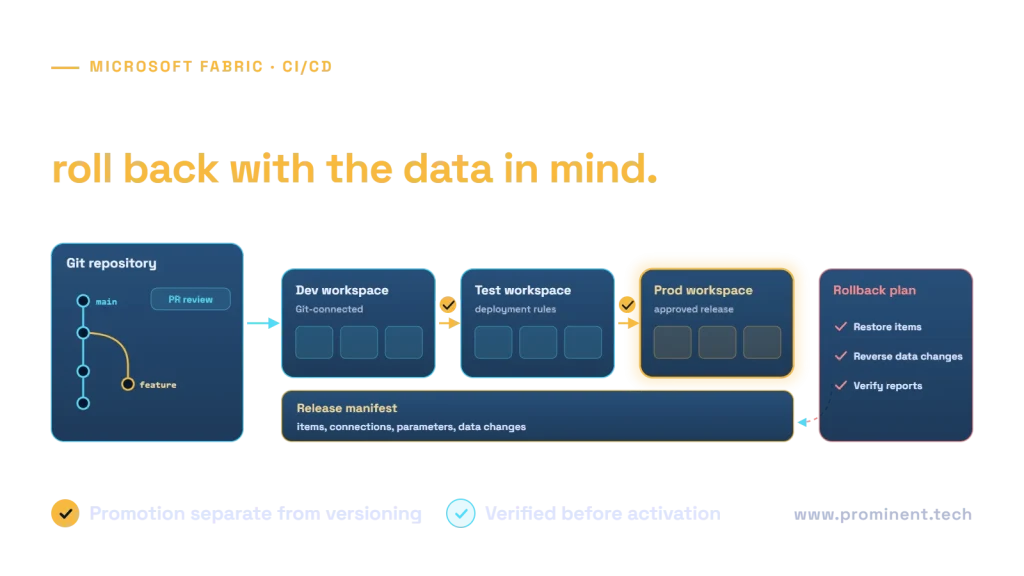
Implement Fabric CI/CD by versioning supported item definitions, separating development, test and production workspaces, and promoting a known revision through validation gates. Treat connections, permissions, schedules and data state as explicit release concerns. A Git commit or successful deployment does not establish that the production workload is ready to run.
This guide includes a practical setup sequence, an illustrative release manifest and a verification checklist. It is documentation-based guidance, not a report of a deployment executed in a customer Fabric tenant.
Key takeaways
- Choose a supported workflow for the item types you actually use.
- Keep production credentials and secrets out of source control.
- Validate target connections and dependencies after promotion.
- Plan definition rollback separately from data recovery.
Separate version control from promotion and execution
Microsoft’s Fabric CI/CD guidance covers Git integration, branched workspaces, variable libraries, deployment pipelines and automation options. Select a combination that matches the solution rather than assuming one mechanism handles every item and setting.
Feature change in isolated development workspace
  → reviewed source revision
  → supported item validation
  → test workspace deployment
  → target bindings + data and access tests
  → approved production promotion
  → post-deployment verification
  → controlled schedule activation
Use a release identifier that links the source revision, deployed items, environment configuration and validation results. The production state should be explainable without asking someone to remember which manual edits they made after deployment.
Read-only consumers should not need development permissions. Scope deployment identities to the required actions and environment. Keep emergency changes visible: record the incident, the change and how it returns to the reviewed source baseline.
A step-by-step setup sequence
Step 1: inventory supported items and dependencies
List notebooks, pipelines, environments, semantic models, reports and data stores in the release. Check current Git and deployment support for each item type, including limitations. Identify external connections and dependencies that a definition export will not recreate automatically.
Use the Git integration process to verify repository, tenant and workspace requirements. Do not broaden permissions merely to make a tutorial work. Ask the accountable administrator to apply the approved access model.
Step 2: establish environment workspaces
Create distinct development, test and production boundaries appropriate to the project. Decide which data is safe in each. A test workspace should not silently write to a production destination because a copied connection still points there.
Document owners, capacity assignments, connection references and schedules. Define who can promote a release and who can activate production execution. These can be separate responsibilities where the business needs that control.
Step 3: connect the development workspace to source control
Choose the supported Git provider, branch and repository folder. Review the initial synchronization direction before accepting changes so existing content is not overwritten unintentionally. Commit a baseline and confirm that the expected supported definitions appear.
Use short-lived feature branches and an isolated workspace where the team workflow supports them. Submit a review that describes the changed behavior, affected data contract and validation evidence. Do not use branch naming as a substitute for an actual review gate.
Step 4: configure promotion stages
For pipelines, Microsoft’s Data Factory CI/CD guide describes connecting Git, assigning workspaces to deployment stages and promoting content. Follow the current item-specific procedure. Confirm supported dependencies and environment bindings after deployment instead of assuming every reference automatically remaps.
Step 5: run a small end-to-end release
Promote a bounded change into test, execute it against approved test inputs and inspect both outputs and permissions. Then rehearse production promotion and recovery with the release owner. Record screenshots from your own environment as evidence; do not substitute a diagram for proof that a real stage was deployed.
Parameterize the environment without hiding dependencies
Separate portable logic from environment-specific references. Use supported configuration mechanisms for the item type, such as applicable variable libraries, deployment rules or documented settings. Not every property supports the same mechanism.
| Setting | Release treatment | Verification |
|---|---|---|
| Source and destination references | Resolve to the approved target environment | Inspect actual endpoints before writes |
| Credentials | Use approved connection and secret management | Verify identity, ownership and scope |
| Schedules | Keep activation controlled | Confirm only intended jobs run |
| Item dependencies | Track source-to-target mapping | Run dependent paths, not only the changed item |
| Permissions | Apply the intended environment policy | Test allowed and denied identities |
Some connectors require post-deployment authentication or configuration. Check current limitations before promising a fully unattended release. A documented manual step is preferable to an automation claim that fails on the first real promotion.
An illustrative release manifest
This YAML is a project-level control record, not a Fabric API payload or a ready-to-run deployment pipeline. Replace placeholders through your approved process; store secret references rather than secret values.
release:
  id: analytics_release_candidate
  source_commit: approved_revision
  target_environment: test
  items:
    - ingestion_pipeline
    - validation_notebook
    - reporting_model
  configuration:
    connection_reference: approved_test_connection
    destination_reference: test_dataset
    schedules_enabled: false
  gates:
    - supported_definitions_valid
    - target_bindings_checked
    - data_reconciled
    - access_tests_passed
  recovery:
    prior_revision: previous_approved_revision
    data_checkpoint: recorded_recovery_point
    owner: platform_release_owner
Keep evidence linked to the same revision. If someone changes the workspace after validation, the prior result may no longer apply. Reconcile drift before promoting rather than treating the test status as permanent.
Verification checklist before activating production
- Deployed item definitions correspond to the approved revision.
- Source and destination references belong to the intended environment.
- Connections authenticate using the expected identity.
- Representative outputs reconcile with the business contract.
- Denied and revoked identities cannot use unintended paths.
- Retries do not duplicate writes or advance an invalid checkpoint.
- Schedules and alerts point to the correct environment and owner.
- The recovery procedure has a known data state and decision maker.
Use the Data Factory migration comparison when the release includes converted pipelines. A definition that deploys successfully can still contain an unsupported runtime behavior.
Rollback is more than reverting Git
Microsoft documents that Git integration re-creates item definitions and does not restore item data. Reverting a notebook does not undo rows it already wrote. Restoring an earlier schema definition may also conflict with later data or dependent consumers.
- Stop or coordinate affected writers and schedules.
- Identify the approved prior definition and the last accepted data checkpoint.
- Choose rollback, replay or forward repair based on the actual state.
- Restore compatible definitions and environment bindings.
- Reconcile data and dependent consumers before resuming execution.
Prefer compatible, staged data-contract changes when possible. For example, introducing a new field before switching consumers can provide a safer transition than immediately removing a field still in use. Record when the old contract can be retired.
Common questions
How do I implement CI/CD for Fabric workspaces?
Version supported definitions, separate environments, promote a known revision and verify target configuration, data and permissions before execution.
Does Git back up my Fabric data?
No. Definition versioning and data recovery are separate concerns. Plan supported data protection and recovery checkpoints independently.
Can every Fabric item use the same deployment method?
Do not assume that. Check the current support and limitations for each item type and its dependencies.
Should production use development connections?
No. Resolve references to the approved production configuration and verify them before writes or schedules are enabled.
Is a successful deployment enough to release?
No. Test runtime behavior, output correctness, effective access and recovery. Deployment success establishes only one part of readiness.
Make every release explainable and recoverable
Combine release checks with capacity validation. Plan your Microsoft Fabric implementation around reviewed changes, target-specific verification and a tested recovery process.