
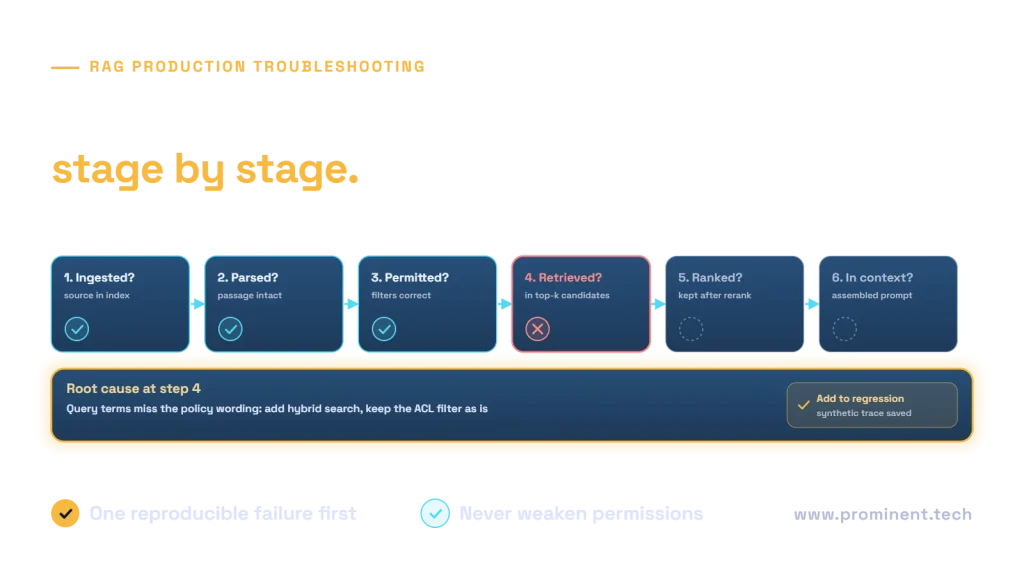
When RAG misses a document, trace the required evidence through source availability, parsing, indexing, authorization, retrieval, ranking and context assembly before changing the answer prompt. The document may never have entered the index, may be correctly excluded by permissions, or may have been retrieved and then dropped. These failures require different fixes.
This runbook provides a diagnostic sequence, synthetic trace examples and regression checks. It is intended for authorized operators using approved test data. Do not disable access controls or expose restricted documents to make a debugging query succeed.
1. Capture one reproducible failure
Record the question, trusted caller scope, expected source and version, application configuration and observed answer. State why the expected source is both relevant and permitted. A source owner may know a document exists while the caller is not entitled to read it.
Preserve request correlation and configuration versions. Keep sensitive prompts and source text out of unrestricted tickets or logs. Use a sanitized reproduction when sharing evidence outside the authorized support group.
| Observed symptom | First question | Likely boundary |
|---|---|---|
| Document never appears | Is the correct source version indexed and permitted? | Ingestion, indexing or authorization |
| Related documents appear, exact one does not | Was an identifier lost or the right passage ranked too low? | Parsing, retrieval or ranking |
| Correct passage is retrieved, answer is wrong | Did the passage reach final context with its qualification? | Context assembly or generation |
| Answer uses an old rule | Which version appears in index, cache and history? | Freshness and invalidation |
| Only one user sees the failure | Do identity, tenant or group scope differ? | Policy or user-specific state |
2. Verify source ingestion and index presence
Find the source by stable identifier, not only by filename. Check ingestion timestamps, source version, deletion status and item-level errors. A successful job summary does not necessarily establish that every document succeeded.
Microsoft’s indexer monitoring documentation distinguishes overall status from individual run results and document errors. In Azure AI Search, a run may be marked successful while tolerating some item failures according to its configuration. Review detailed evidence for the actual missing item.
For custom ingestion, reconcile source, parsed, embedded and indexed record counts. A queue acknowledgment may mean work was accepted, not completed. Check retries, poison-item handling and whether an update wrote to the index queried by the application.
Do not rebuild everything as the first response
A full rebuild can hide the original failure, consume processing budget and leave a recurring source problem unresolved. Identify the failed boundary first, then use a controlled reprocessing or rollback plan. Preserve the prior configuration and consider impact on active queries.
3. Inspect the exact parsed passage
Open the extracted representation for the expected source. Confirm reading order, headings, identifiers, tables and relevant exceptions. A PDF that visually contains the answer may have an empty text layer or a table whose column labels were lost.
Compare the chunk sent for embedding with the source, not only a generic parser success flag. Check whether a condition falls into a separate chunk and whether the source reference remains stable. If the text is missing here, retrieval tuning cannot recover it.
Use the chunking strategy guide for boundary tests and the multimodal architecture guide for tables and diagrams. Tune by document type instead of applying one arbitrary chunk size everywhere.
4. Validate identity and filters without weakening them
Compare the authenticated tenant and current user scope with indexed permission metadata. Look for stale memberships, wrong field names, inconsistent identifier formats and missing grants. Confirm that server policy, not client input, constructs the effective access boundary.
A denied result can be correct behavior. If the expected source should be allowed, repair the authorized permission synchronization or policy mapping. Do not remove a production tenant filter as a shortcut. Use synthetic fixtures to test filter logic safely.
Current Azure document-access guidance distinguishes string-based security filters from supported identity-aware mechanisms. Confirm which mechanism the deployed API and data source actually use. A field named “permissions” is not evidence that enforcement is working.
5. Separate candidate retrieval from final ranking
Observe candidate identifiers before and after fusion or reranking. If the expected passage is absent from the candidate set, inspect query formulation, searchable fields, filters and embedding compatibility. If it appears but is later dropped, inspect ranking and selection settings.
Exact identifiers
Product codes, error strings and contract references may need lexical matching. Test a keyword route alongside semantic retrieval. Do not assume that a semantically related result is sufficient for an exact lookup.
Embedding compatibility
Verify that document and query vectors use the intended model, preprocessing and dimensions. Equal dimensions do not prove that two embedding models share a compatible space. Record model and index schema versions so a partial migration is visible.
Candidate depth and reranking
Increasing candidate depth may reveal whether a passage is narrowly missed, but also raises processing and context-selection work. Change one setting at a time. A reranker cannot select a document that never entered its candidate set.
Azure hybrid search documentation describes combining text and vector retrieval with rank fusion. Our search strategy comparison explains the evaluation questions without treating raw scores from different methods as interchangeable.
6. Inspect the context actually supplied to the model
A correct retrieval result may be removed by deduplication, token trimming or an overly aggressive summary. Check the final evidence references and relevant text under authorized debugging controls. Retain qualifications and document versions.
If the answer remains unsupported despite adequate evidence, inspect instruction conflicts, source contradictions and response validation. Treat retrieved instructions as untrusted content. A document must not be able to change tenant scope or authorize a new tool call.
Check caches and conversation history when the answer appears stale. A fresh retriever does not help if an old answer cache bypasses it or earlier restricted content is repeatedly supplied in history.
7. Use a minimal, safe diagnostic trace
The following is a synthetic application trace, not a vendor schema or an actual incident. It uses fictional source identifiers and deliberately omits document text and credentials.
{
  "request_id": "synthetic-Q-17",
  "config_version": "retrieval-v4",
  "corpus_snapshot": "approved-fixture-v2",
  "policy_version": "acl-v3",
  "expected_source": "fixture-policy-12",
  "source_indexed": true,
  "scope_check": "allowed",
  "candidate_ids": ["fixture-policy-12", "fixture-policy-18"],
  "selected_context_ids": ["fixture-policy-18"],
  "diagnostic_stage": "context_selection"
}
This trace points to selection after retrieval: the expected source was a permitted candidate but did not reach context. It does not justify changing the parser or bypassing permissions. Inspect selection and token-budget rules, then test the proposed correction on held-out cases.
| Boundary | Evidence to collect | Targeted correction |
|---|---|---|
| Source to parsed record | Missing section or incorrect reading order | Parser or layout handling |
| Parsed record to index | Failed item or wrong target index | Ingestion mapping, retry or deployment configuration |
| Index to permitted candidates | Scope and filter decision | Authorized policy synchronization or query configuration |
| Candidates to selected evidence | Rank, deduplication and trimming decisions | Selection, fusion, reranking or context budget |
| Evidence to answer | Unsupported or omitted claims | Context clarity, instructions and answer validation |
8. Prove the fix without breaking another question type
- Reproduce the original failure under the same permitted scope.
- Apply a targeted configuration or data correction.
- Run the case and related held-out questions.
- Check no-answer, exact identifier, exception and denied-access cases.
- Measure latency and accounted cost as well as answer quality.
- Release gradually with an observable rollback path.
- Add the reviewed failure to a regression suite and document ownership.
Use the RAG evaluation framework to distinguish retrieval recall from answer support. A repaired query is useful evidence, but it does not establish that the entire corpus is fixed.
Common questions
Why does my RAG system miss a document that exists?
Existence alone is not enough. Check whether the right version was parsed, indexed, authorized, retrieved and retained in final context. Trace one expected source through each boundary.
Should I increase top-k immediately?
First identify where evidence disappears. A larger candidate set may help a ranking-depth issue but cannot repair missing ingestion, incorrect permissions or broken parsing.
Why is the answer wrong when retrieval found the right passage?
The passage may be dropped or truncated before generation, mixed with conflicting evidence or used incorrectly. Inspect final context, qualifications, source versions and answer support.
Can an indexer succeed while some documents fail?
Depending on the service and configuration, yes. Review item-level errors and run details for the specific source rather than relying only on an overall status.
Should I disable filters to debug retrieval?
Do not weaken production authorization. Validate filter behavior with approved synthetic fixtures and repair trusted policy mapping or synchronization when an allowed source is incorrectly excluded.
Turn an incident into a repeatable reliability check
For the broader design, see the enterprise RAG architecture guide and RAG versus fine-tuning comparison. To review ingestion, retrieval and evidence failures in your application, request an enterprise RAG architecture review.