
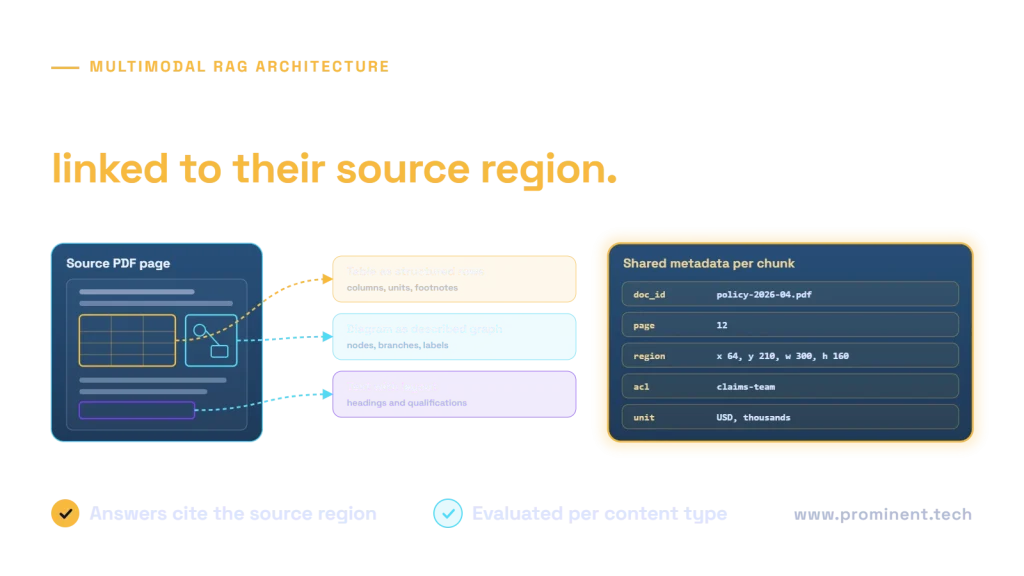
Multimodal RAG retrieves evidence from text, tables and visual material while preserving where each fact came from. A reliable pipeline does more than run OCR over a PDF: it keeps layout, headings, units, figure references and permissions, then selects the appropriate representation for the question. Some tasks need structured table values; others need the original image as well as a searchable description.
This guide describes a mixed-document architecture and worked fictional examples. The examples demonstrate evidence design, not measured extraction accuracy or completed customer work.
A multimodal RAG reference architecture
Approved PDF / image / document
    → classify pages and detect layout
    → text paragraphs | tables | figures and diagrams
    → preserve page, region, headings, units and source version
    → create searchable text + structured data + visual references
    → index with trusted permission metadata

Authenticated question
    → retrieve permitted candidate evidence
    → choose text, structured values and/or original visual
    → assemble bounded multimodal context
    → generate answer with source-region citations
    → validate quantities, support and access boundaries
Keep the original source and derived representations connected. If a text description helps find a chart, the answer stage may still need the actual chart region to verify axes and labels. A description is a retrieval aid, not an infallible replacement for the source.
The Azure Document Intelligence layout model documents extraction of text, tables and document structure. Its supported formats and outputs depend on the chosen version and input type. Validate your actual files instead of assuming every embedded visual is extracted equally.
Choose the representation that preserves the answer
| Source element | Useful representation | Preserve | Typical failure |
|---|---|---|---|
| Paragraph or procedure | Text with section hierarchy | Headings, conditions and nearby exceptions | Reading order mixes columns |
| Table | Structured rows plus readable rendering | Row and column headers, units and footnotes | A number loses its period or unit |
| Chart | Original crop plus verified description or extracted values | Axes, legend, scale and annotations | Trend description misreads the axis |
| Process diagram | Original visual plus labeled steps and relations | Arrow direction, branches and conditions | OCR captures labels but loses connections |
| Scanned page | OCR text linked to page regions | Image quality, location and uncertain fields | Characters or decimal points are confused |
A text-only retrieval index can search descriptions and extracted text, then return visual references for an image-capable answer model. A multimodal embedding approach can offer another retrieval route. Neither removes the need to test whether the required evidence is actually found and interpreted correctly.
Microsoft’s RAG chunking guidance discusses processing visual material through descriptions or multimodal inputs and the associated processing cost. Use that choice selectively: a decorative logo rarely deserves the same extraction budget as a technical diagram.
Worked example: a table with units and a qualification
Consider this fictional equipment table. The question is: “What is the allowable pressure for device B during normal operation?”
| Device | Normal limit, bar | Temporary test limit, bar |
|---|---|---|
| A | 6 | 8 |
| B | 4 | 7 |
Fictional footnote: Temporary test limits require the approved test procedure and are not normal operating limits.
A flat OCR stream containing “B 4 7” does not preserve enough meaning. Store the device label, both column headers, the unit and the footnote together. The supported answer is 4 bar for normal operation, with a clear distinction from the temporary test value. This is a fabricated reading example, not equipment guidance.
A source-linked record
{
  "document_id": "fictional-manual-01",
  "source_version": "v2",
  "page": 12,
  "element_id": "table-3-row-B",
  "element_type": "table_row",
  "row_label": "B",
  "normal_limit": {"value": 4, "unit": "bar"},
  "test_limit": {"value": 7, "unit": "bar"},
  "footnote_ref": "table-3-note-1"
}
This is an illustrative application record, not the response schema of a particular vendor API. Add trusted tenant and permission fields in the real implementation. Numerical comparison or aggregation can use deterministic code over validated structured values; the model can explain the result and cite the source.
Worked example: a process branch that OCR alone misses
Suppose a fictional support diagram shows “Receive request → Validate details → Approved?” with one arrow to “Schedule work” and another to “Request clarification.” OCR might return all five labels without showing which branch leads where.
Preserve the original region and extract candidate relations such as “Approved: yes → Schedule work.” Review ambiguous arrows and retain uncertainty rather than inventing a connection. For a question about the rejected branch, retrieve the branch relation and the visual, not only a generic summary of the whole page.
Generated descriptions should distinguish what is visible from what is inferred. A diagram showing a review step does not establish that the review was completed or that a particular policy is satisfied. Link any narrative interpretation back to the actual evidence.
Metadata is the link between representations
Use stable document and element identifiers to connect OCR text, table cells, image crops and descriptions. Include source version, page and region coordinates when available, extraction method and relevant confidence or review status. Keep machine-generated descriptions distinguishable from original source text.
Apply permissions to every derivative
An image crop, caption or table row can reveal restricted content just as a paragraph can. Propagate source permissions to every indexed representation and enforce them before model context construction. Secure visual URLs and citation routes independently; a hidden index entry does not protect a publicly reachable crop.
Avoid combining material with incompatible permissions into a shared description or summary. Follow the document-level RAG security checklist for revocation, tenant isolation and cache handling.
Evaluate retrieval and interpretation separately
A correct crop can still produce a wrong answer, and an excellent model cannot interpret evidence that was never retrieved. Label the required source regions and expected answer conditions before testing the end-to-end system.
| Layer | Test | Failure evidence |
|---|---|---|
| Parsing | Compare extracted headings, cells and reading order with the page | Missing column header or mixed text blocks |
| Retrieval | Check whether required permitted regions are returned | Related page found but necessary table absent |
| Interpretation | Check values, units, arrows, legend and qualifications | Correct region, wrong column or branch |
| Answer support | Trace each material claim to a source region | Unsupported inferred quantity or relationship |
| Access | Test denied crops, table rows and visual links | Restricted derivative reaches context or browser |
Include rotated scans, low-contrast pages, merged cells, multi-page tables, repeated captions and conflicting versions. Review no-answer behavior when labels are illegible. Report results by document type instead of allowing simple text pages to hide failures on charts.
For the broader measurement framework, use our RAG evaluation guide. An overall answer score should not replace inspection of the parsing and retrieval failures that caused it.
Operate visual processing as a versioned pipeline
Classify which elements need expensive processing, reuse valid results for unchanged sources and invalidate them when content or permissions change. Track extraction configuration and model versions. If a parser changes table segmentation, downstream element IDs and gold labels may need reconciliation.
Bound image size and context volume according to the supported model and task. Cropping too tightly can remove a legend or qualification; passing whole high-resolution documents can increase latency and cost. Evaluate both evidence sufficiency and resource usage.
Retain a review queue for uncertain or consequential values. A confident generated description should not silently replace an unreadable source. Keep operational logs useful without copying restricted images into broadly accessible telemetry.
Common questions
How does multimodal RAG retrieve images and tables?
It can index extracted text, structured table data, visual descriptions or multimodal embeddings, then return the appropriate source evidence for the answer stage. The best combination depends on the document and question.
Is OCR enough for PDF RAG?
Not when meaning depends on layout, table headers, units, legends or arrows. OCR text should remain linked to document structure and source regions, with additional representations where necessary.
Should every image be sent to a vision model?
No. Classify its relevance first. Technical figures may need visual interpretation, while decorative assets may add processing cost without helping the target questions.
How should a RAG answer cite a chart?
Provide an authorized reference to the source document and relevant page or region. Keep the original chart available for verification and distinguish extracted values from generated interpretation.
Can descriptions replace original figures?
They can help retrieval, but can omit or misinterpret details. Preserve the original and use it when the question depends on visual evidence that the description does not reliably capture.
Design retrieval around the document’s meaning
Read the enterprise RAG architecture guide and RAG versus fine-tuning comparison for the surrounding application choices. To review a mixed-layout document corpus and its evidence requirements, request an enterprise RAG architecture review.