
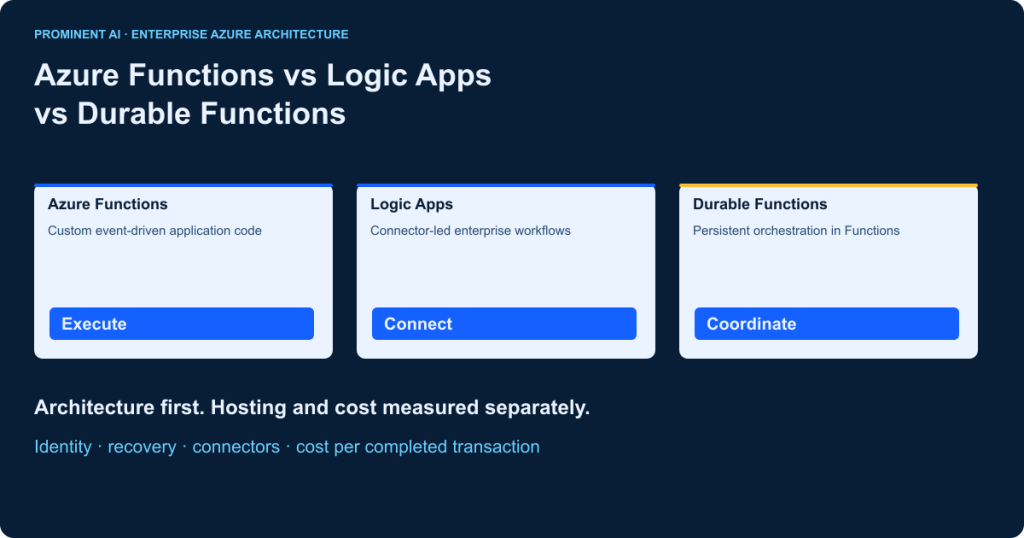
Azure Functions vs Logic Apps is primarily a choice between custom execution and managed integration. Use Functions for event-driven application code, Logic Apps for connector-rich business workflows, and Durable Functions when Functions needs persistent, code-based orchestration. Durable Functions extends Azure Functions; it is not a separate hosting plan. Both Logic Apps and Durable Functions can coordinate long-running processes and human decisions. A hybrid can separate connectivity from domain logic, but adds operational boundaries. Compare the exact hosting plan, connector behavior, security requirements and cost per completed transaction before deciding. Neither performance nor price has a universal winner.
Key takeaways
- Begin with one business transaction and its failure paths, not a product preference.
- Compare Functions hosting separately from workflow design and durable storage.
- Choose Logic Apps Consumption or Standard deliberately; managed connector charges can remain in Standard.
- Persist waiting workflows instead of holding an HTTP request or worker open.
- Measure accepted outcomes, retries, operator effort and total cost together.
What is Azure Functions?
Azure Functions runs application code in response to an event. A function app groups functions with shared configuration and a hosting environment. Each function has a trigger: an HTTP request, queue message, scheduled timer or storage event, for example. Bindings provide supported connections to data and messaging services. C#, JavaScript, Python and other supported language stacks let developers own parsing, computation and application rules. See the Functions overview.
Typical starting points include webhook validation, lightweight APIs, file processing, scheduled cleanup and queue consumers. An ordinary Function can participate in a larger workflow through messages and application state without using Durable Functions. The team then owns that coordination. Do not hold one invocation open for a multi-day business process: worker restarts, HTTP timeouts and lost progress require a different design.
What is Azure Logic Apps?
Logic Apps connects systems using workflows built from triggers, actions, conditions and connector operations. It suits Microsoft 365, Dynamics, ERP and partner integration when managed connectivity removes repeated authentication and protocol work. The visual designer is one authoring surface; workflow definitions, custom code and deployment pipelines are also available. Integration accounts and B2B artifacts may be relevant to partner agreements, schemas, maps and EDI requirements. They are not mandatory for every workflow. See the Logic Apps overview.
Consumption provides a multitenant workflow resource. Standard provides a single-tenant runtime with multiple workflows and stateful or stateless execution choices. A connector is not a promise that every operation supports the same identity, network route, payload or throttle. Verify the actual operation before committing to an architecture.
Standard C# code-first workflows: distinguish preview from established options
The Logic Apps Standard SDK for C# workflows is documented as preview at this review. Its limitations include unavailable service-provider operations, dynamic schemas and managed-identity connector authentication. Evaluate its current support contract before production adoption. This preview is distinct from calling Functions, editing JSON definitions or using custom .NET functions inside Standard workflows. Logic Apps is not limited to no-code development.
What is Azure Durable Functions?
Durable Functions adds stateful orchestration to a function app. Client functions start or query an instance; orchestrators coordinate steps; activities perform work; entities manage durable state through their supported programming model. History and messages are persisted by a configured backend. The runtime can reconstruct progress by replay rather than requiring a worker to remain alive. The programming-model reference explains these roles; the overview explains the extension relationship.
An orchestrator must remain deterministic across replay. Put network calls, database writes and arbitrary side effects in activities or supported durable APIs. Use the orchestration context for time and durable timers; do not use ordinary sleep, random values or current-clock reads to make replay-sensitive decisions. Activities still need idempotency because re-execution can occur. Persistent history is coordination state, not your complete business ledger. See orchestrator constraints.
Azure Functions vs Logic Apps vs Durable Functions: key differences
| Decision dimension | Azure Functions | Azure Logic Apps | Durable Functions |
|---|---|---|---|
| Purpose | Execute custom event-driven logic | Integrate systems through workflows | Coordinate stateful application processes |
| Relationship | Azure execution service | Integration service with hosting choices | Extension running within Functions |
| Authoring | Application source code | Designer/definitions; code extensions; C# SDK preview | Programmatic durable APIs |
| Boundary | Invocation and function app | Workflow and connector operation | Orchestration instance and activity |
| Triggers | HTTP, timer and supported event bindings | Polling, push and request triggers | Client starts; external signals |
| Connectivity | Bindings, SDKs and APIs; check connector maturity | Built-in and managed connectors | Activities use Functions connectivity |
| Orchestration | Application owns coordination unless extended | Workflow engine coordinates steps | Durable runtime coordinates code |
| State | External application persistence when needed | Stateful history; stateless option in Standard | Persisted history/entity state |
| Long duration | Split work; respect execution/HTTP limits | Use supported stateful workflow patterns | Persist waits between activities |
| Human decisions | Build callback and state handling | Approval/connectivity patterns | External events and timeouts |
| Custom logic | Primary strength | Inline/custom code or called APIs | Activity code and orchestration logic |
| Conditions | Language control flow | Conditions, switches and expressions | Deterministic language control flow |
| Parallelism | Trigger/concurrency or application code | Parallel branches and loops | Fan-out/fan-in of activities |
| Retries | Trigger-specific and application policy | Action retry policies | Activity retry/exception handling |
| Recovery | Re-delivery or application checkpoint | Run-after scopes and compensation | Replay persisted progress; compensate side effects |
| Events | Queue consumers and event handlers | Connector triggers and event actions | Start/signal persistent processes |
| Scaling | Hosting plan and trigger dependent | Hosting, connector and workflow limits | Functions host plus backend capacity |
| Latency | Cold/warm host and dependency effects | Trigger, engine and connector effects | Scheduling, replay and activity effects |
| Hosting | Flex, legacy Consumption, Premium, Dedicated, Container Apps | Consumption or Standard options | Selected compatible Functions plan |
| Networking | Plan-specific integration and endpoints | Runtime and connector route differ | Host plus backend connectivity |
| Identity | Entra/managed identity where supported | Operation-specific authentication | Client, activity and backend identities |
| Security | Code, input, bindings and permissions | Workflow access and connector privileges | History exposure and signal authorization |
| Monitoring | Application Insights and Azure Monitor | Run history plus diagnostic telemetry | Instance history plus correlated telemetry |
| Debugging | Local code tests and host tools | Designer, local Standard and run diagnostics | Replay-aware tests and activity debugging |
| CI/CD | Code plus infrastructure artifacts | Definitions/connections plus infrastructure | Version compatible orchestrations and activities |
| Operations | Own code and dependency behavior | Own connections, workflow design and exceptions | Own state retention, versions and recovery |
| Billing | Selected compute meters plus dependencies | Action/connector or hosting meters plus dependencies | Host plus chosen durable backend |
| Complexity | Low for isolated handlers; grows with manual workflow | Lower connector plumbing; governance still needed | Less manual checkpointing; replay discipline needed |
| Team fit | Developers maintaining business logic | Integration engineers and developers | Developers comfortable with distributed state |
| Enterprise fit | APIs, transformations and event consumers | ERP/SaaS/B2B coordination | Batch, approvals and application orchestration |
This is a qualitative architecture matrix, not a speed ranking. Confirm limits against the selected release, region, connector and hosting plan. A simple queue consumer should not acquire an orchestration engine merely to make the table look complete.
Architecture diagrams: execution, integration and durable coordination
A. Event-driven Functions

Authenticate the ingress and validate the event before business work. Choose HTTP for a request/response contract, Event Grid for supported event notification, and Service Bus for brokered work with queue semantics. These are alternatives, not interchangeable delivery guarantees. Identity and telemetry span the path; retry ownership must be explicit.
B. Connector-driven Logic Apps

A trigger creates a workflow instance. Actions transform and route data through supported connectors. Consumption and Standard host the engine differently; a managed connector can still execute outside a Standard runtime. Draw that boundary in a network review rather than assuming a private host makes every downstream operation private.
C. Durable Functions

The orchestrator schedules activities and waits for results or events. The durable backend persists coordination history, rather than being the business destination after the activities. Arrows to the backend in this figure represent state exchange, not an additional sequential business step. Monitoring correlates the client, instance and activities.
Azure Functions hosting plans explained
| Plan | Billing/capacity | Scaling and startup | Key design check |
|---|---|---|---|
| Flex Consumption | On-demand execution/memory meters; optional always-ready baseline | Event-driven; configurable concurrency; Linux | VNet integration, memory choice and regional quota |
| Legacy Consumption | Execution meters and applicable grants | Event-driven; cold starts possible | Existing platform needs, limited execution time and migration |
| Premium | Provisioned instances/resources | Event-driven with warm capacity | Baseline cost, network requirements and minimum instances |
| Dedicated/App Service | App Service capacity | Manual/autoscale; configure Always On | Shared capacity, isolation and plan limits |
| Container Apps | Container Apps billing model | Replica/trigger configuration | Container image, scaling integration and environment charges |
Microsoft recommends Flex Consumption for new serverless function apps where requirements fit. It offers Linux execution, configurable memory and virtual networking. Premium, Dedicated and Container Apps address different capacity or packaging requirements. The legacy plan remains relevant to existing workloads and platform dependencies. Do not copy limits or deployment-slot assumptions between plans. See hosting comparison and Flex guidance.
Check the exact runtime, OS, trigger, region and quota before provisioning. Current hosting documentation has inconsistent Linux Consumption retirement labels: its summary marks Linux retired while its retirement note gives 30 September 2028. For an existing app, confirm the applicable migration notice in Azure rather than interpreting that summary as a universal immediate shutdown. Runtime-version retirement is a separate issue.
Logic Apps Consumption vs Standard
| Dimension | Consumption | Standard |
|---|---|---|
| Runtime/resource | Multitenant; one workflow per resource | Single-tenant; multiple workflows share capacity |
| State | Stateful workflow | Stateful or stateless; choose deliberately |
| Connector execution | Built-in and hosted managed operations | In-runtime built-ins plus hosted managed operations |
| Provisioning | Consumption metering | Workflow hosting capacity; other Standard environments have different terms |
| Network | Validate connector/endpoint route | VNet/private endpoint capabilities; connector route still matters |
| Deployment | Workflow resource and connections | Project/package plus infrastructure and connections |
| Performance | Shared service limits and operation throttles | Tune capacity and workflow settings; downstream throttles remain |
| Monitoring | Trigger/run/action history and diagnostics | Stateful history and diagnostics; stateless history differs |
| Economics | Metered executions and related resources | Hosting floor plus applicable connector/storage charges |
| Typical evaluation | Intermittent integration with modest operation counts | Consolidated integrations needing runtime/network control |
A Standard stateless workflow is not an alternative name for a durable approval process. Choose stateful execution when persistence and recovery are required. Standard capacity can be efficient when utilized, but multiple workflows also share a failure and resource boundary. Reserve capacity for peaks, not just monthly averages. Reference: hosting and workflow comparison.
Durable Functions orchestration patterns
| Pattern | Practical application | Control to design |
|---|---|---|
| Chaining | Validate → extract → post document | Retry and business outcome per activity |
| Fan-out/fan-in | Validate independent document pages in parallel | Bound concurrency and aggregate errors |
| Async HTTP API | Accept a job then expose status | Protect status endpoints; return before long work |
| Monitor | Check an external job until complete | Backoff, deadline and stop condition |
| Human interaction | Wait for an authorized reviewer | Event identity, duplicate signals and expiry |
| Durable timer | Escalate after a decision deadline | Context time and cancel unused timers |
| Sub-orchestration | Reusable approval subprocess | Version compatible parent/child contracts |
| Long approval | Pause claim progression for specialist review | Retention, escalation and late-event policy |
For document approval, store the file in governed object storage, pass a reference, validate in an activity, await a reviewer event with a durable deadline, then post an accepted result. Resume from recorded progress after interruption; do not repeat a payment or ERP write blindly. External events, timers, monitor and fan-out guidance describe these mechanics.
Select the backend separately. Durable Task Scheduler is Azure-managed; the Azure Storage provider uses queues, tables and blobs. Other providers have specific support requirements. Microsoft currently recommends the scheduler, but region, compatibility, retention and cost still require assessment. Its Consumption SKU has a GA announcement, although an older billing table still labels it preview. Verify the selected SKU in the target region. Use the current provider list/CLI in the scheduler documentation; do not assume global availability. See backend options.
When to choose Functions, Logic Apps or Durable Functions
Choose Functions for a bounded custom operation
A developer-owned calculation, webhook handler or queue transformation may need no workflow designer. Favor the simplest handler that satisfies validation, replay and observability requirements. High event volume is a reason to measure concurrency and dependency limits, not automatic evidence that one platform wins on price.
Choose Logic Apps for integration-led workflows
ERP synchronization, Microsoft 365 routing, partner messaging and connector-heavy approvals can justify managed workflow capabilities. Evaluate connector licensing, API limits and operational visibility alongside development effort. A team maintaining dozens of vendor interfaces may spend more on custom upkeep than on action charges.
Choose Durable Functions for code-led persistent coordination
Use it when application developers need stateful branching, parallel activities, timers and explicit recovery in code. Logic Apps can also implement long-running workflows; Durable Functions is not inherently more capable just because its authoring model is programmatic. Skill fit, backend behavior and change management often settle the decision.
Hybrid architecture: Logic Apps + Functions + Durable Functions

An illustrative invoice process starts through an email connector or protected API. Logic Apps owns inbound connectivity; a Function validates file metadata; Durable Functions coordinates extraction, business checks and any human review. Logic Apps then invokes the ERP connector. The file store owns documents, the ERP owns accepted financial records, and durable history owns orchestration progress. Carry one business correlation ID across all components.
Place authorization before starting work and before accepting an approval. Limit each identity to its data and operation. Define retry ownership at every handoff, with idempotency keys on posting. Route exhausted or invalid cases to an exception queue and operator workflow. This design adds hosting, connector and telemetry charges: omit services whose responsibility is already met elsewhere.
Azure Functions vs Logic Apps pricing: model the business transaction
Pricing review: 30 October 2026; East US; USD; public pay-as-you-go planning basis. These are editable planning settings, not a quote. The official pricing pages expose dynamic rates that were not reliably available for every configuration in this review. Therefore the examples calculate usage quantities and provide configurable rate formulas, not invented dollar totals. Check agreement discounts, tax, currency, region and grant eligibility in your subscription. Sources: Functions pricing and Logic Apps pricing.
Meter the complete execution path
| Option | Core cost expression | Costs to add |
|---|---|---|
| Functions on demand | Billable executions × execution rate + metered GB-seconds × compute rate | Always-ready baseline/execution if enabled; storage, network, telemetry and dependencies |
| Functions Premium/Dedicated | Provisioned resource units × billed hours | Scale floor, idle capacity, storage and dependencies |
| Logic Apps Consumption | Σ billable operations of each class × its rate | Polling, retries, loops, retention, integration account and downstream services |
| Logic Apps Standard | Hosting capacity × hours + applicable managed connector meters | State storage, network, telemetry and dependencies |
| Durable Functions | Selected Functions plan + chosen backend meters | Activities, replay behavior, retention, signaling and dependencies |
For Functions, measure metered instance memory and execution time under the actual concurrency configuration; allocating configured memory independently to every concurrent request can overstate billable GB-seconds. Apply free grants only when eligible and only once across shared usage. For Logic Apps, count the executed trigger/action path, including retries, branches and loop iterations. Polls can be billed even when no workflow starts. Standard built-in operations and managed operations have different meters; fixed hosting does not cover everything. See usage metering.
Durable waiting is not continuous orchestrator compute: an awaited durable task yields execution. Activities, backend storage/actions, retention, polling and provisioned capacity can still cost money. Consumption-plan orchestrator replays are billable invocations; other plan behavior differs. Avoid applying that legacy statement indiscriminately to every hosting meter. Scheduler billing and Azure Storage transaction costs are separate choices. See Durable billing.
Four configurable monthly scenarios
| Scenario | Explicit illustrative assumptions | Calculated usage inputs | Comparison to price |
|---|---|---|---|
| A. Simple API | 100,000 requests; serial 0.2-second execution; 1 GB metered memory; 99% completion; no retries | 100,000 calls; 20,000 GB-s; 99,000 successful transactions | Functions execution + compute; equivalent Logic Apps action path; add durable overhead only if needed |
| B. Enterprise integration | 100,000 runs; 5 built-in and 4 standard managed operations/run; 2% retry one managed action; 98% completion | 500,000 built-in operations; 402,000 managed operations; 98,000 successes | Consumption operations versus Standard host + managed meters; include connections and ERP charges |
| C. Approval | 100,000 instances; 4 activities × 0.25 seconds × 1 GB; 8 billable host invocations/instance assumed; 3-day approval wait; 97% completion | 100,000 activity GB-s; 800,000 assumed host invocations; 97,000 successes; backend actions measured separately | Durable host/backend versus equivalent stateful Logic Apps path; do not bill 72 hours as active compute |
| D. High volume | 1,000,000 events; serial 0.15 seconds × 1 GB; one retry on 3%; 99.5% completion | 1,030,000 handler executions; 154,500 GB-s; 995,000 successes | On-demand versus provisioned capacity; queue, dependency and monitoring limits included |
All counts above are assumptions for planning, not measured benchmarks or universal billing multipliers. Actual trigger batching, instance concurrency, workflow paths, grants and backend history change them. For each option calculate infrastructure + connector/action + state + monitoring + dependencies + operations labor, then divide by successful business transactions. A cheap invocation with expensive manual recovery may be the more costly design.
The downloadable worksheet has separate rate, unit, grant, region and evidence fields. Unknown prices remain unknown rather than silently becoming zero. Enter storage transactions/GB-months, log ingestion/retention, network transfer, Service Bus, API Management, ERP licensing and any integration-account charges. Avoid counting the same managed meter as both a connector and an action. Compare a realistic peak-capacity floor with a quiet month as well as the average.
Performance, latency and scalability: a reproducible test
Use equivalent contracts and dependency stubs first, then repeat against the real integration sandbox. Record region, runtime/extensions, plan, memory, concurrency, payload sizes, connector operation, backend and deployment commit. Keep data and accepted outcomes identical. A Function response time and a multi-day approval completion time cannot be compared as the same latency.
| Test phase | Controlled workload | Evidence to collect |
|---|---|---|
| Cold and warm | Isolated event after idle; repeat on warmed capacity | Startup frequency; p50/p95/p99 ingress-to-result |
| Steady and burst | Fixed rate then burst with known queue depth | Throughput, backlog age, dependency throttles and errors |
| Recovery | Dependency outage, duplicate delivery and worker interruption | Accepted completion, recovery time and duplicate side effects |
| Long workflow | Approval signal before/after deadline | Correct terminal state, late-event handling and retained evidence |
| Economic | Same completed business workload | Meter exports and cost per accepted outcome |
Run multiple trials, preserve raw results and separate warm/cold samples. Declare a business SLO before selecting concurrency. Report both successes and failures; discarded timeouts can make a fast-looking p95 misleading. No benchmark was executed for this article. Microsoft’s reliability guidance is a starting point, not a substitute for your measurements.
Enterprise security and governance
Separate the workflow author, runtime identity, reviewer and operator. Use Entra ID and managed identity where the selected operation supports them; assign narrow RBAC and data permissions. A Function key is not equivalent to per-user business authorization. Protect APIs and approval callbacks, rotate unavoidable secrets through controlled configuration, and keep secrets out of source and run history. References: Functions connections and Logic Apps security.
Review ingress, egress, private endpoints and connector execution routes independently. Minimize payloads in history and logs, agree retention/deletion, restrict diagnostics access and validate residency across every dependency. Encryption alone does not establish compliance. Security acceptance should include a denied-access test, expired credential behavior and a demonstrated separation between test and production. The C# Standard SDK preview has authentication limitations; do not assume mature designer capabilities carry over to it.
Error handling, monitoring and reliability checklist
- Use a stable business idempotency key and atomically record accepted side effects.
- Bound transient retries; do not retry invalid business data indefinitely.
- Define poison/dead-letter handling and an operator owner.
- Model partial completion and compensation explicitly; a refund is not a database rollback.
- Propagate business, workflow and trace correlation identifiers without sensitive payloads.
- Alert on backlog age, terminal failures and stalled approvals, not only CPU.
- Exercise recovery and document safe resubmission rules.
- Retain business audit evidence independently where required; run history is not a complete audit system.
Logic Apps scopes and run-after paths can model recovery; Durable exceptions and activities can coordinate compensation. Neither makes external writes exactly-once by default. Workflow error handling and idempotent Functions design explain why retry policy and business correctness must be designed together.
DevOps and CI/CD comparison
Keep code, definitions, Bicep or Terraform, connection references and configuration contracts in version control. GitHub Actions or Azure DevOps should build, test and promote the same artifact with environment-specific identity and settings. Standard can separate workflow project deployment from infrastructure. Do not copy developer connection secrets into a release package. See Standard deployment guidance.
Test expressions, mappings, activity logic and end-to-end recovery. Use deployment slots only where the chosen plan supports them. Version long-running instances deliberately: changing orchestration order or activity signatures can break replay. Drain, route or version in-flight work with a documented rollback strategy rather than simply overwriting it. See Durable versioning guidance.
Practical .NET / C# and workflow examples
These are concise structural examples, reviewed against Microsoft APIs but not compiled or deployed in this environment. Start with an Azure Functions v4 isolated-worker template and a currently supported .NET target. Pin compatible stable worker, Service Bus and DurableTask extension versions in your project. Avoid mixing Microsoft.Azure.WebJobs in-process APIs with isolated-worker code. The isolated-worker reference notes in-process support ends 10 November 2026.
1. Service Bus Function: reject invalid input and preserve retry behavior
using Microsoft.Azure.Functions.Worker;
using Microsoft.Extensions.Logging;

public sealed class ValidateInvoice(ILogger<ValidateInvoice> log)
{
    [Function(nameof(ValidateInvoice))]
    public void Run(
        [ServiceBusTrigger("invoice-jobs", Connection = "ServiceBus")]
        string documentId)
    {
        if (string.IsNullOrWhiteSpace(documentId))
            throw new InvalidOperationException("Missing document reference");
        // Replace with validated, idempotent application work.
        // Do not log document contents or credentials.
        log.LogInformation("Validated an invoice work item");
    }
}
The sample does not implement business persistence. Configure the identity-based Service Bus connection, permissions, retry and dead-letter policy separately; do not swallow processing failures. See Service Bus trigger.
2. Logic Apps workflow: safe, small request example
{
  "definition": {
    "$schema": "https://schema.management.azure.com/providers/Microsoft.Logic/schemas/2016-06-01/workflowdefinition.json#",
    "contentVersion": "1.0.0.0",
    "triggers": {
      "Request": {
        "type": "Request",
        "kind": "Http",
        "inputs": {
          "schema": {
            "type": "object",
            "properties": {
              "documentId": {
                "type": "string"
              }
            },
            "required": [
              "documentId"
            ]
          }
        }
      }
    },
    "actions": {
      "Acknowledged": {
        "type": "Response",
        "kind": "Http",
        "inputs": {
          "statusCode": 202,
          "body": {
            "state": "received"
          }
        },
        "runAfter": {}
      }
    },
    "outputs": {}
  },
  "kind": "Stateful"
}
This Standard workflow definition demonstrates a request and response only. It does not enqueue work, enforce documentId semantics or authorize a caller. Add those controls before accepting a real job. A 202 response alone is not a durable acceptance guarantee. See the trigger/action schema.
3. Durable orchestration: an approval with an expiry
using Microsoft.Azure.Functions.Worker;
using Microsoft.DurableTask;

public static class ApprovalFlow
{
    [Function(nameof(ApprovalFlow))]
    public static async Task<string> Run(
        [OrchestrationTrigger] TaskOrchestrationContext ctx)
    {
        string id = ctx.GetInput<string>()
            ?? throw new InvalidOperationException("Missing document ID");
        await ctx.CallActivityAsync("ValidateDocument", id);
        using var timerCancel = new CancellationTokenSource();
        Task expiry = ctx.CreateTimer(
            ctx.CurrentUtcDateTime.AddDays(3), timerCancel.Token);
        Task<bool> approval = ctx.WaitForExternalEvent<bool>("Approval");
        if (await Task.WhenAny(approval, expiry) == expiry)
            return "expired";
        timerCancel.Cancel();
        if (!await approval) return "rejected";
        await ctx.CallActivityAsync("PostApprovedDocument", id);
        return "approved";
    }
}
Implement and register the named activities and a protected client/callback separately. Add bounded activity retry and compensation according to the downstream contract. Never accept an unverified boolean from a public endpoint as approval: authenticate the reviewer, authorize that instance and deduplicate signals. The sample omits those application components and does not constitute a deployable approval system.
Enterprise use cases: illustrative architecture choices
| Business requirement | Candidate and integration | Controls and economic trade-off |
|---|---|---|
| Insurance claims | Logic Apps intake; Durable evidence/approval coordination; claims API | Restrict claim access; long retention and specialist exceptions drive cost |
| Invoice automation | Logic Apps connector plus Function validation; optional durable review | Idempotent ERP posting; action count and extraction service cost |
| Healthcare administration | Stateful workflow around approved scheduling interfaces | Minimize patient data; connector access, residency and review controls |
| Manufacturing alerts | Queue-triggered Function transforms equipment events | Device/source trust; bursts, broker limits and false-alert handling |
| Retail order coordination | Durable activities across stock, payment and fulfillment APIs | Compensation and duplicate prevention; downstream limits dominate |
| Financial review | Logic Apps evidence routing or Durable domain workflow | Separate reviewer role and audit ledger; retention and manual work |
| CRM/ERP synchronization | Logic Apps supported connectors; custom Function for mappings | Conflict ownership and loop prevention; poll/retry connector meters |
| SaaS event processing | Function consumer; durable extension only for persistent jobs | Tenant authorization and quotas; throughput plus capacity floor |
These are hypothetical design starting points, not completed client projects. The candidate depends on the actual connector, security review and accepted business outcome. A healthcare or financial workflow does not become compliant merely because it runs in Azure.
Choosing the right Azure serverless architecture

| Decision inputs | Starting candidate | Validate before selection |
|---|---|---|
| Custom code, simple event, short duration | Functions | Latency, concurrency, dependencies and host cost |
| Managed connectors, intermittent integration | Logic Apps Consumption | Executed operations, connector permissions and limits |
| Consolidated workflows, network/runtime control | Logic Apps Standard | Capacity utilization, statefulness and connector route |
| Persistent state, human signals, domain branching | Durable Functions | Replay, backend, versioning and operations skill |
| Connectivity and application orchestration both substantial | Hybrid | Whether added boundaries earn their operating cost |
Score requirements in plain language: code complexity, connector coverage, state, duration, human input, volume, concurrency, identity, networking, latency, team skills, monitoring, operational ownership, hosting, cost, maintainability and existing Microsoft investments. Avoid arbitrary weighted scores that conceal a failed mandatory security requirement. Reject infeasible candidates first; prototype the remaining trade-off.
Common Azure serverless architecture mistakes
| Mistake | Mitigation |
|---|---|
| One invocation waits for a business approval | Persist state; use an event and deadline |
| Designer convenience decides architecture | Validate contracts, support and operator ownership |
| Connector meters ignored | Count actual actions, retries, polls and applicable rates |
| Durable treated as a hosting plan | Choose host and backend independently |
| Replay ignored | Keep orchestrators deterministic and side effects in activities |
| Clock/network calls in orchestrator | Use context time and durable/activity APIs |
| Duplicate events assumed impossible | Use business idempotency and atomic acceptance |
| No dead-letter owner | Assign alerts, triage and safe resubmission |
| Cold starts ignored | Test idle-to-first-result and warm capacity cost |
| Storage/network assumed free | Include retention, transfer and backend meters |
| Shared powerful credentials | Use scoped identity and controlled secret rotation |
| Missing correlation | Carry business and technical identifiers safely |
| Success-only dashboards | Alert on backlog, failures and stalled instances |
| Plan parity assumed | Check OS, region, feature and extension support |
| All three services used everywhere | Keep only justified responsibility boundaries |
Enterprise implementation roadmap
| Phase | Activities and deliverable | Acceptance and accountable roles |
|---|---|---|
| 1. Assess process | Agree transaction, SLO and exception owner; process brief | Business owner accepts outcome and recovery needs |
| 2. Inventory integrations | Map APIs, connectors, identities and data; contract inventory | Integration architect and system owners validate access |
| 3. Select architecture | Compare feasible options; decision record | Architect and operations owner accept boundaries |
| 4. Model security/cost | Threat review and dated meter model | Security and FinOps approve assumptions and budget |
| 5. Prove design | Equivalent workload and failure tests; evidence pack | Engineering demonstrates correctness and measurable SLO |
| 6. Implement | Pipelines, tests, runbooks and version strategy | Release owner accepts rollback and support readiness |
| 7. Operate/improve | Monitor outcomes, meters and exceptions; review backlog | Operations and business owners agree improvements |
Set timelines after discovering integration constraints. An unapproved ERP interface or missing data owner is not solved by choosing a faster authoring tool.
How Prominent AI Services LLP can help
Prominent’s published API and system integration scope includes contracts, mappings, authentication, recovery and monitoring. Its Cloud and DevOps services cover cloud architecture, infrastructure as code, CI/CD and operational reviews. Start with an assessment or proof of concept, then agree implementation, dedicated engineering capacity or ongoing support as appropriate. No certification, fixed saving or delivery timeline is implied.
For the broader deployment-boundary decision, see microservices vs monolithic architecture. A workflow engine is not a reason by itself to split an application into services.
Frequently asked questions
What is the difference between Azure Functions and Logic Apps?
Functions centers on event-driven custom code; Logic Apps centers on integration workflows and connector operations. Both can combine code and connectivity, so choose by the responsibilities you need to maintain.
What is the difference between Azure Functions and Durable Functions?
Durable Functions extends Functions with persistent orchestration, activities, entities and durable waiting. Ordinary Functions still suit isolated handlers and workflows coordinated elsewhere.
Are Durable Functions a separate Azure service?
Durable Functions is an extension in a function app, not a separate compute plan. Its configured orchestration backend, such as Durable Task Scheduler, can be a separate Azure resource with its own charges.
When should I use Logic Apps instead of Azure Functions?
Evaluate Logic Apps when supported connectors, integration operations and workflow visibility remove substantial custom plumbing. Confirm security, API limits and total executed-operation cost.
Which is cheaper: Azure Functions or Logic Apps?
There is no universal answer. Compare the exact plan, executed path, connector costs, backend, monitoring, dependencies and operational effort per successfully completed transaction.
What is Azure Functions Flex Consumption?
It is a Linux-based serverless hosting option with configurable memory, event-driven scaling, virtual network integration and optional always-ready capacity. Confirm regional support, quota and runtime compatibility.
What is the difference between Logic Apps Consumption and Standard?
Consumption uses a multitenant, single-workflow resource. Standard supports multiple stateful or stateless workflows on a single-tenant runtime, with a different capacity and connector billing model.
Can Logic Apps call Azure Functions?
Yes. Use an appropriate supported operation or authenticated API call. Validate identity, routing, retry behavior and the endpoint contract.
Can Azure Functions trigger Logic Apps?
Yes, through an authorized request endpoint or an event source consumed by the workflow. Use the integration mechanism that fits delivery and security requirements.
When should I use Durable Functions?
Use it for code-led processes needing persistent coordination, activities, timers, external signals or parallel work. Do not add it to a simple event handler without a stateful requirement.
Does Durable Functions support long-running workflows?
Yes. Persistent coordination lets a process wait and resume without one invocation running continuously. Individual activities, retention and hosting constraints still matter.
What are common Durable Functions orchestration patterns?
Chaining, fan-out/fan-in, asynchronous HTTP, monitoring, human interaction, durable timers and sub-orchestrations. Each needs explicit failure and completion semantics.
How are Durable Functions billed?
Through the selected Functions hosting plan and durable backend, plus related dependencies. Activity execution, replay behavior, backend actions or storage and telemetry can contribute.
Do Durable Functions incur costs while waiting?
A durable wait does not keep orchestrator execution billing running continuously. Backend retention, other work and provisioned hosting capacity can still create charges.
Are Azure Functions suitable for enterprise integration?
Yes, especially custom transformations, APIs and event consumers. Your team still owns contracts, authorization, recovery and observability; managed integration workflows may reduce connector maintenance.
Does Logic Apps support custom code?
Yes: definitions, inline/custom code and called Functions are options. The Standard C# code-first SDK is separately documented as preview with limitations at this review.
Which service scales better?
Scaling depends on the hosting plan, trigger, connector throttles, backend and downstream capacity. Benchmark an equivalent accepted workload rather than ranking product names.
How do you secure Azure serverless workflows?
Authorize ingress and business decisions, use narrowly scoped identities where supported, secure connections/history, validate network paths and test denied access. Review each selected SKU and operation.
Can all three services be used together?
Yes. Logic Apps can own connectivity, Functions custom operations and Durable Functions stateful coordination. Use that combination only when the responsibility split justifies its added cost and operations.
Which Azure service is best for an approval workflow?
Logic Apps can fit integration-led approvals; Durable Functions can fit domain-heavy code-led approvals. Decide using identity, callback security, deadlines, retention, connector needs and team skills.
Technical sources reviewed 30 October 2026. Recommendations, usage scenarios and diagrams are illustrative. No customer outcomes, deployed sample results, benchmark measurements or unverified cloud prices are claimed.