
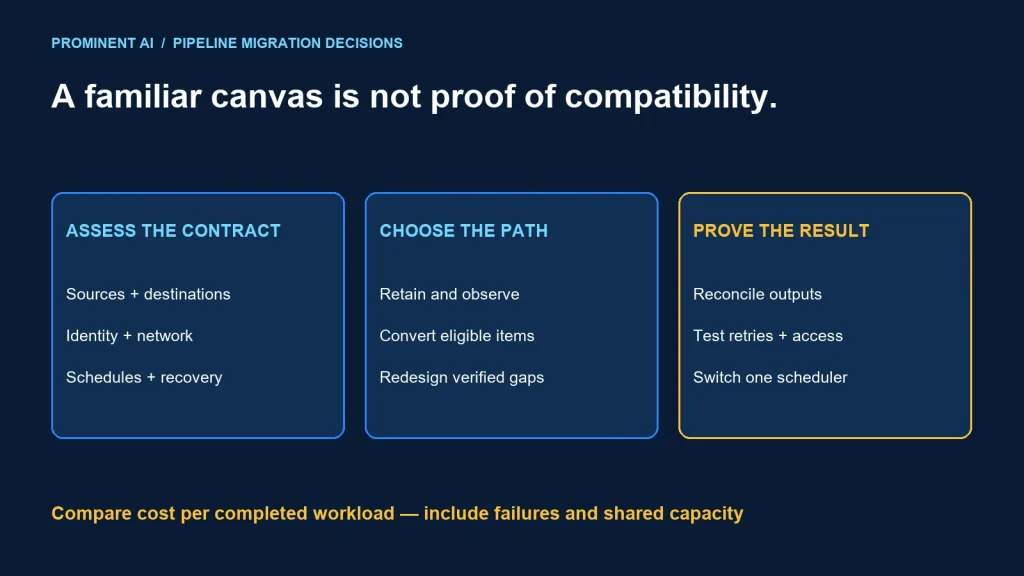
Move Azure Data Factory pipelines into Fabric when the target offers a verified operational benefit and the required activities, connectors, identities and network paths pass assessment. Fabric integration with analytics items can simplify a platform design, but a familiar pipeline canvas does not establish feature equivalence. Retain or migrate workloads based on evidence rather than a blanket replacement rule.
Key takeaways
- Assess the complete source-to-destination path, including authentication and recovery.
- Separate visibility of an existing ADF instance in Fabric from actually converting its pipelines.
- Compare measured total cost, not only different billing labels.
- Cut over one accountable workload at a time and prevent duplicate schedules.
Fabric Data Factory vs Azure Data Factory
Azure Data Factory is an Azure data-integration service. Fabric Data Factory provides integration within the Fabric workspace environment. Microsoft’s official comparison identifies differences in pipeline definitions, connection and dataset handling, execution, monitoring and billing. Pipelines in Fabric integrate with Lakehouse, Warehouse and other Fabric items.
| Area | Azure Data Factory | Fabric Data Factory | Decision evidence |
|---|---|---|---|
| Platform context | Azure data-integration resource | Fabric workspace integration | Who operates the complete analytics path? |
| Source configuration | Linked services and reusable dataset objects | Connections with relevant data properties in activities | Check parameterization and connection ownership |
| On-premises access | Self-hosted integration runtime patterns | Supported gateway patterns | Test the real network and authentication route |
| Cost model | Usage-based Azure components | Fabric capacity consumption | Measure the same completed workload |
| Deployment and monitoring | ADF-specific release and run controls | Fabric item and workspace controls | Rehearse promotion, alerting and rollback |
This matrix is a planning aid, not a complete feature-parity list. Check the current connector and activity detail before committing. Support for a source name alone does not prove support for your authentication, write mode, data type or network configuration.
Assess the pipeline contract, not only its activities
For each pipeline, record the business outcome, source freshness requirement, expected destination state and recovery rule. A daily successful status is insufficient if a pipeline silently omits late corrections. Use the same contract to evaluate the existing implementation and its candidate replacement.
- Connector behavior: verify source and sink modes, pagination, schema handling, timeouts and supported data types.
- Identity and secrets: confirm who owns connections and how credential changes affect runs.
- Network access: test gateways and private connectivity using the intended deployment configuration.
- Control flow: compare expressions, parameters, child calls, branching and failure paths.
- Scheduling: list every source trigger and target schedule with its time zone and dependencies.
- Operations: verify logs, alert routing, retry behavior and support ownership.
Build a compatibility register with one row per pipeline and evidence for each dependency. Use “unknown” where a feature has not been tested. Treating unknowns as ready creates a false impression of migration progress.
Transformation compatibility needs its own review
Microsoft’s upgrade planning guide describes eligible Mapping Data Flows moving to MDF transforms in Dataflow Gen2 and identifies that path as preview at the time checked. Review supported transformations, connectors, authentication and limitations. Unsupported cases can require redesign using an appropriate transformation engine; do not label every data flow directly portable.
Even when conversion succeeds, test joins, null handling, precision, duplicates and late-arriving data. A generated artifact is a candidate implementation until its outputs match the agreed contract.
Three migration options
1. Retain execution while improving visibility
Microsoft documents an ADF item experience that exposes an existing factory within Fabric. This can support discovery and side-by-side assessment. It should not be described as proof that the underlying pipelines have been converted to Fabric-native execution.
Use this stage to assign owners and prioritize migration waves. Avoid a prolonged state in which the platform team cannot tell which system actually schedules or executes each job.
2. Assess and convert supported pipelines
The built-in upgrade path provides readiness assessment for eligible assets. Review the assessment results and validate converted outputs. Keep a record of activities needing review rather than using the number of copied pipelines as the acceptance metric.
3. Rebuild the unsupported or strategically different parts
A manual redesign can be appropriate when the target operating model is materially different. Define the intended benefit before rewriting: fewer handoffs, clearer ownership, a simpler data contract or a required capability. Retaining a reliable workload can be better than a migration whose only outcome is a new canvas.
Compare cost per completed business workload
Choose a representative period and capture normal runs, retries, failures and backlog recovery. Record which costs are incremental and which are shared. An existing Fabric capacity does not make new work free; additional demand can affect other workloads and future capacity decisions.
| Budget line | What to collect | Common omission |
|---|---|---|
| Execution and movement | Measured activity and movement usage or capacity consumption | Failed runs and retries |
| Transformation | Compute needed for equivalent correct outputs | Different engines and test conditions |
| Supporting resources | Gateway operation, storage and applicable data movement charges | Resources outside the pipeline service |
| Migration effort | Assessment, refactoring, testing and parallel operation | Temporary dual-running cost |
| Operations | Monitoring and support effort | Incident response and ownership gaps |
Use current regional pricing and contract terms. Do not infer a percentage saving from the difference between usage-based billing and capacity-based billing. Refer to the Fabric capacity planning guide for evaluating concurrent demand.
Decision flow and illustrative use cases
First: does the pipeline serve a Fabric-centered target architecture? Second: do its connectors, identities and network paths pass assessment? Third: does a pilot meet correctness, freshness, recovery and cost requirements? If any answer is unresolved, assess or retain the affected part instead of forcing cutover.
Routine ingestion into a curated Fabric dataset
A bounded ingestion job with a supported connection is a reasonable pilot candidate. Test full load, incremental updates, replays and downstream freshness. The practical output is a reconciled dataset and a repeatable runbook, not merely a green pipeline status.
Complex private-network integration
A pipeline depending on specialized network and authentication arrangements needs a connectivity pilot first. Verify the actual route with the security and network owners. If a required behavior is unsupported, retain that execution path or redesign it deliberately.
Metadata-driven orchestration across many sources
A framework that dynamically chooses sources needs careful parameter and connection assessment. Prototype multiple source types and an invalid configuration. Confirm that an incorrect metadata record cannot direct the job into an unintended destination.
Release checks before switching schedules
- Reconcile key coverage and business aggregates, not just row counts.
- Test failed runs and idempotent replay.
- Verify allowed, denied and revoked identities.
- Check time zones and dependency schedules.
- Ensure only the intended scheduler owns production execution.
- Rehearse rollback or forward recovery using a recorded checkpoint.
- Confirm alert routing and the named on-call owner.
For a wider platform migration, use the Synapse-to-Fabric migration roadmap. Keep source retirement separate from first cutover so a meaningful business cycle can be observed.
Common questions
When should I move ADF pipelines into Fabric?
When a verified platform benefit, compatible dependencies and a successful representative pilot justify the change. Do not migrate solely because the interfaces look similar.
Does mounting ADF in Fabric convert my pipelines?
No. Visibility of an existing ADF instance and conversion to target execution are distinct steps. Verify where scheduling and execution actually occur.
Are all ADF connectors and activities identical in Fabric?
Do not assume parity. Check the current activity, connector, authentication and network support for each pipeline.
Is Fabric Data Factory always cheaper?
No universal cost result applies. Compare correct completed workloads, retries, supporting resources, migration effort and shared-capacity impact.
Can Mapping Data Flows migrate without redesign?
Eligible flows have a documented upgrade path, subject to current feature status and limitations. Assess unsupported transformations and validate the converted results.
Choose a migration path that improves operations
Bring pipeline dependencies and observed run behavior into the decision. Plan your Microsoft Fabric implementation around measured compatibility, explicit ownership and a controlled transition.