
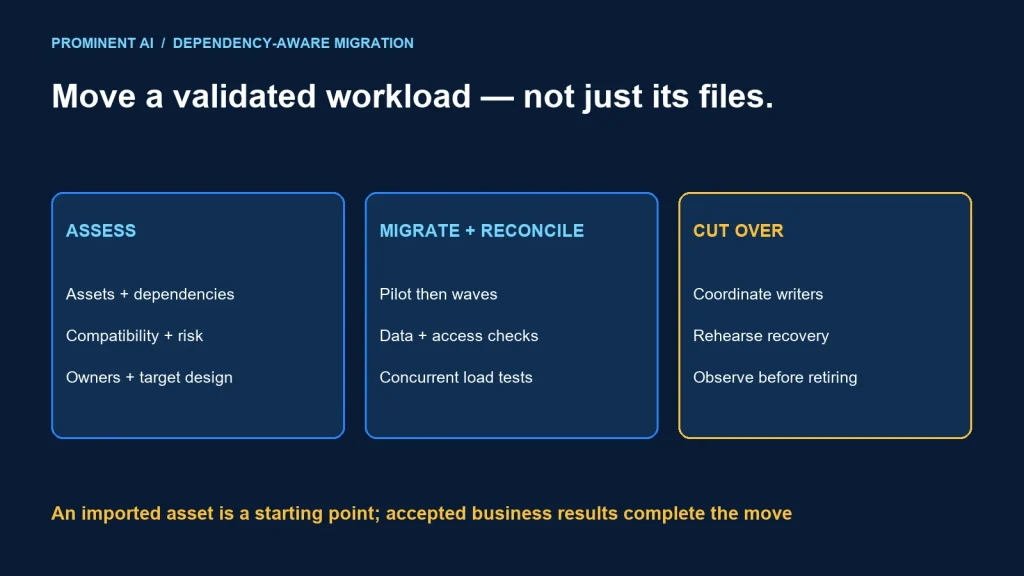
Migrate Azure Synapse Analytics to Microsoft Fabric as a set of assessed workloads, not as a single workspace copy. Inventory pipelines, notebooks, SQL pools, data dependencies and reporting consumers. Choose a target for each workload, validate compatibility and security, then cut over in controlled waves with a tested recovery route.
This roadmap provides an inventory template, risk register and rollback structure. It does not assume that every Synapse feature has an equivalent Fabric implementation or that migration is necessary for every stable workload.
Key takeaways
- Separate Spark, SQL, orchestration and semantic-model workstreams.
- Use migration tools for supported assets, then validate their output.
- Reconcile business results and access boundaries as well as row counts.
- Retain a viable source or forward-recovery path until cutover evidence is accepted.
Start with a dependency-aware inventory
List assets with their business owner, technical owner, criticality and dependencies. Do not treat an exported notebook or pipeline definition as the whole application: authentication, runtime libraries, schedules, storage permissions and downstream reports also determine behavior.
| Asset group | Capture | Migration evidence |
|---|---|---|
| Pipelines | Activities, triggers, parameters, connectors, gateways and retry logic | Equivalent orchestration and recovery tests |
| Spark workloads | Notebooks, jobs, pools, libraries, runtime settings and paths | Compatible environment and reconciled outputs |
| Dedicated SQL pools | Tables, views, procedures, data types, transformations and consumers | Schema and code assessment, data validation and query tests |
| Serverless SQL usage | External data access, query patterns, permissions and dependencies | A selected target with tested semantics and cost |
| Semantic models and reports | Connections, business measures, refresh and security roles | Metric reconciliation and representative user validation |
Record assets that should be retired or retained as well as those to migrate. A rarely used pipeline might still support an annual obligation; validate usage with its owner before removing it. Preserve the decision and supporting evidence.
Choose a Fabric target for each responsibility
For Spark, Microsoft’s Synapse Spark migration overview identifies runtime, environment, data-access, metadata and code-refactoring work. Supported migration tooling can accelerate item transfer, but the process still requires adaptation and validation. Importing a notebook does not prove that its libraries, authentication and external dependencies work in the target.
For dedicated SQL workloads, the dedicated SQL pool migration guidance describes assistant and manual approaches for schema, code and data movement. Assess compatibility before deciding that a successful table copy is sufficient. Choose a method that fits the actual object set, data volume and cutover constraints.
Use the Lakehouse versus Warehouse decision matrix when the target is unclear. A SQL-owned relational mart and a mixed-file Spark transformation stage may need different target experiences. Define which component owns writes and which one serves consumers.
Deliver in migration waves with explicit gates
Wave 0: readiness and landing environment
Agree on scope, success measures, support ownership and data-handling rules. Establish target workspaces, approved connections, source control and deployment conventions. Confirm that the target region, capacity and required features fit the workload. Document any preview dependencies and their acceptance criteria.
Wave 1: representative pilot
Choose a bounded workload with real dependencies and an available owner. A trivial example may miss the risks; the most critical platform-wide job may be too large for a first wave. Migrate the code and data-access path, compare results and rehearse failure recovery. Capture the changes so the next wave can reuse a proven pattern.
Wave 2: dependency groups
Move connected assets together where separation would create an unstable boundary. For example, migrating a transformation without its downstream schema contract can break reporting even if the job completes. Use a wave manifest listing each asset, target, owner, validation result and rollback condition.
Wave 3: production cutover and observation
Switch consumers only after agreed checks pass. Monitor a meaningful business cycle, including late corrections or peak periods. Schedule source retirement separately from cutover so a short period of apparent success does not force premature decommissioning.
Maintain a risk register that drives decisions
| Risk | Detection | Mitigation | Gate owner |
|---|---|---|---|
| Unsupported SQL or different semantics | Object assessment and representative query tests | Refactor, select another target or retain workload | SQL lead |
| Library or runtime incompatibility | Environment manifest and smoke tests | Pin supported versions and test replacements | Engineering lead |
| Over-broad access after role mapping | Allowed, denied and revoked identity tests | Redesign permissions and remove unnecessary grants | Security owner |
| Duplicate or missing incremental records | Watermark and reconciliation checks | Idempotent replay and explicit checkpoint ownership | Data owner |
| Capacity contention | Concurrent pilot and operational metrics | Optimize, schedule or validate another capacity | Platform owner |
This is an illustrative register, not a claim that a particular migration has those failures. Add probability, impact, due date and evidence links for your environment. An unresolved high-impact risk needs an explicit decision, not a green status based only on asset count.
Validate data, behavior, security and operations
Reconcile at multiple levels. Row counts detect some omissions; they do not detect incorrect joins or measure definitions. Compare key coverage, null rates, duplicates, aggregates and representative business outputs. Use tolerances only where the data contract justifies them, and record why.
For incremental loads, test initial load, normal changes, late arrivals, deletions where supported, failed runs and replays. Define which system owns the checkpoint during parallel running. Two schedulers writing independently can create duplicate or conflicting outcomes.
Microsoft’s security, validation and cutover guidance covers mapping controls and completing readiness checks. Treat mappings as a starting point: verify effective permissions and connectivity with representative identities. Confirm that monitoring, alert ownership and incident response work in the destination.
- Run business queries and compare agreed results.
- Verify job schedules, credentials and connection ownership.
- Test a retry without duplicate side effects.
- Check unauthorized and revoked access paths.
- Observe latency and deadlines under concurrent demand.
- Rehearse the support runbook with the team that will operate it.
Write the rollback plan before the switch
Rollback is a state-management problem, not merely pointing a report at its old connection. If the new system has accepted writes or advanced a watermark, the source may no longer represent the latest state. Decide whether recovery means switching back, replaying from a durable source or repairing forward.
- Define triggers. Specify reconciliation failures, critical deadline misses or access-control failures that stop the wave.
- Record the recovery point. Preserve the last accepted source checkpoint, configuration and schema versions.
- Control writers. Freeze or coordinate the affected write path during the transition.
- Reconcile the delta. Identify records processed after the recovery point and how to replay them safely.
- Validate restored service. Recheck outputs and consumer access before declaring recovery complete.
Only decommission source resources after owners accept the validation evidence, recovery obligations and retention plan. Do not claim that Fabric universally replaces Synapse or that every source should be shut down on the same date.
Common questions
How do you migrate from Synapse to Fabric?
Inventory workloads, assess target compatibility, migrate a representative pilot, validate data and controls, then cut over in dependency-aware waves.
Can I copy an entire Synapse workspace unchanged?
Do not assume that. Different asset types, runtimes, connections and security models require assessment and validation even when tools transfer supported items.
Should dedicated SQL pools always become a Lakehouse?
No. Evaluate relational, transactional and development requirements. Warehouse, Lakehouse or retaining a workload can be appropriate depending on the constraints.
How long should source and target run in parallel?
Long enough to validate the relevant business cycle and recovery conditions. Set the duration from workload risk and evidence rather than a universal number of days.
What should block production cutover?
Unresolved critical reconciliation, access, compatibility or recovery failures should block the affected wave until its accountable owner accepts a tested remedy.
Build a migration plan around evidence
Use the capacity planning guide for concurrent workload validation. Plan your Microsoft Fabric implementation with an inventory, risk register and rehearsed cutover rather than an untested asset transfer.