
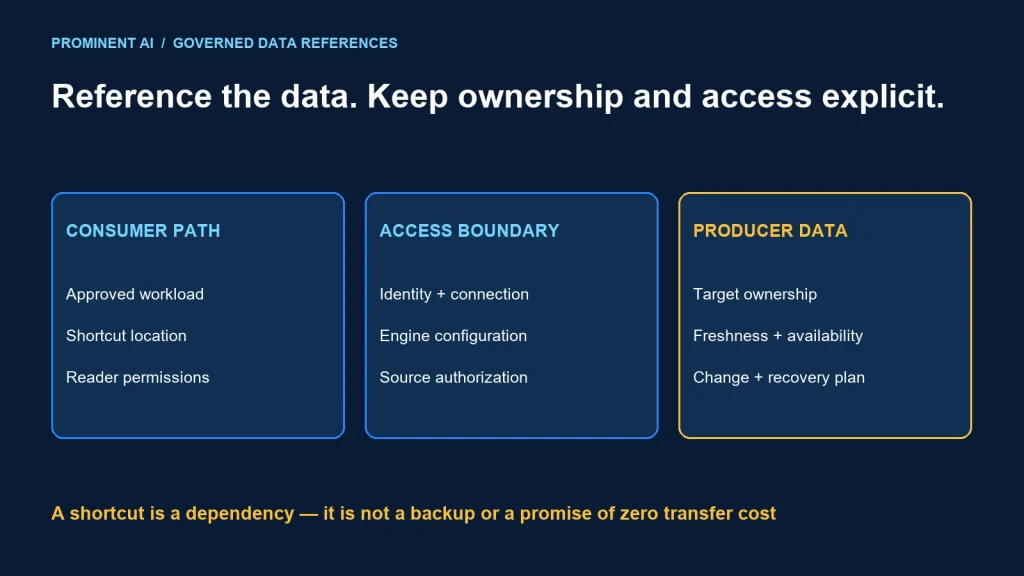
OneLake shortcuts point to data in another supported location so Fabric workloads can use it through a OneLake path without maintaining a separate ingestion copy for that access pattern. The source still owns its data and availability. Permissions, identity mode, network access, format compatibility and caching determine what consumers actually see.
A shortcut is useful when data should remain under its producer’s ownership. It is not automatically a backup, a transformation pipeline or a guarantee of low-cost cross-cloud queries.
Key takeaways
- Document both the shortcut path and the actual target.
- Verify the identity used at the target for each consuming engine.
- Test freshness and latency with the configured cache behavior.
- Manage source renames, credential changes and deletion as dependencies.
How a shortcut connects a consumer to a producer
The OneLake shortcuts overview defines a shortcut as an object pointing to another storage location. Its visible location is the shortcut path; the referenced location is the target path. Targets can be internal or supported external sources. Moving or renaming the target can break the reference.
Consumer workload
  → authorized OneLake shortcut path
  → selected identity and connection rules
  → target data location
  → supported read path and configured cache behavior
  → consumer result
The architecture separates logical discovery from physical ownership. A team can publish access to a governed dataset without asking each consumer to create an independent pipeline. The operating contract still needs a named producer and a clear response when the target changes.
Tables and files have different purposes
Choose the destination area for the intended data experience. File access and table discovery are not the same operation. A reference to arbitrary files does not automatically provide a valid analytical table. Check the supported format and table registration requirements before designing SQL or reporting consumers around it.
For the serving choice, use the Lakehouse versus Warehouse guide. A shortcut can reduce unnecessary copying, but it does not remove the need for a suitable write and query interface.
Check permissions at both locations and the effective identity
Microsoft’s shortcut security guidance describes permissions on the shortcut and target, including exceptions to identity pass-through for certain engine configurations. Do not assume the human reader’s identity always reaches the target. Delegated access and external connections can use a configured identity.
For each consumption route, record the caller, the identity used at the source and the controls that limit the caller’s view. Then test the result. A successful administrator query says little about what a restricted business user can access.
| Test | Expected evidence | Failure implication |
|---|---|---|
| Allowed reader | Only intended records or paths are accessible | Connection or policy is incomplete |
| Denied reader | Access is rejected through every tested route | Review effective roles and engine identity |
| Revoked permission | Access removal behaves as documented after applicable propagation | Investigate identity, policy and cache assumptions |
| Service identity | Scope matches the workload’s required data | Reduce unnecessary source permissions |
Include notebook, SQL and reporting access where those interfaces are permitted. Do not infer one interface’s security behavior from another. Keep negative-test evidence alongside the configuration record.
Create a configuration contract before implementation
Use the same-tenant shortcut creation guide for supported portal steps and connection choices. External and cross-tenant sources have their own setup requirements. Select the source-specific guidance rather than applying an internal shortcut recipe to every target.
The following YAML is an illustrative design manifest, not a Fabric API payload or an executable provisioning file. It deliberately contains no credentials. Resolve real resource references through your approved deployment process.
shortcut_contract:
  name: reviewed_sales_reference
  consumer_owner: analytics_team
  producer_owner: sales_data_team
  shortcut_path: Tables/reviewed_sales_reference
  target_reference: approved_source_location
  access_mode: review_for_selected_source_and_engine
  source_identity_reference: approved_connection_if_required
  intended_access: read_only_business_consumption
  freshness_target: agree_with_data_owner
  cache_policy: verify_supported_configuration
  change_notification: producer_to_consumer_owner
  tests:
    - allowed_reader
    - denied_reader
    - source_change
    - connection_failure
Confirm names, paths and ownership in a non-production environment first. Do not place a source secret in a notebook, shared manifest or article example. Define how connection ownership survives staff changes and how credentials are maintained without broadening access.
Latency, caching and cross-cloud cost
Referencing remote data removes a particular copy pipeline; it does not remove data transfer. Query engines still need to read relevant content. Source location, file layout, read volume, concurrency and cache state can affect user experience and costs.
The shortcuts overview documents caching for supported external scenarios. Treat the selected cache behavior as part of the freshness contract. Measure first access, repeated access and source updates separately. “No ingestion copy” should not be marketed as “no cached data” or “no network movement.”
| Scenario | Measure | Decision |
|---|---|---|
| First read | Latency, errors and source requests | Does initial access meet the target? |
| Repeated read | Latency and observed cache behavior | Is the improvement repeatable? |
| Source update | Time until consumers observe the intended change | Does freshness meet the contract? |
| Concurrent consumers | Source pressure, query latency and capacity use | Is shared access sustainable? |
| Source unavailable | Error behavior and support route | Is recovery understood? |
Use actual provider and regional terms for applicable transfer and request charges. Compare with a controlled copy approach under the same workload. Repeated broad scans can make a physically curated dataset preferable even when shortcuts are technically available.
A shortcut is a live dependency, not a recovery copy
Publish source changes through an agreed contract. A renamed folder, removed column or expired connection can affect multiple consumers. Keep a dependency register and validate downstream consumers before changing a shared target.
Deleting the shortcut object is different from deleting content reached through it. Microsoft documents that removing a shortcut leaves its target intact, while deleting a file or folder inside a shortcut can delete target content when the caller has the required permissions. Make that distinction explicit in operating procedures.
For read-only consumption, grant only the access needed by the approved path. If a workflow genuinely requires writes, define the owner, conflict handling and recovery process separately. Do not treat the presence of a folder in an explorer as permission to alter its contents.
Plan producer and consumer failures
Agree on source availability, support hours and recovery expectations. If a critical reporting deadline needs a stable snapshot, decide whether the live-reference model meets it. A backup or retained snapshot needs its own supported design; the shortcut alone does not establish one.
Troubleshooting by observed symptom
- Access denied: check item and path permissions, selected engine mode and effective target identity.
- Table not discovered: verify destination area, supported format and target structure.
- Reference breaks: inspect target rename, move, deletion or connection changes.
- Stale result: distinguish source freshness, cache behavior and downstream model refresh.
- Slow queries: compare source reads, data layout, concurrency and capacity before blaming the shortcut alone.
Record the failing consumer and access route before changing permissions. Broadening access to make one test pass can hide the real cause and create a new exposure.
Common questions
How do OneLake shortcuts access data without copying it?
They reference a supported target through a OneLake path rather than requiring a separately maintained ingestion copy. Reads still involve data access and may use configured caching.
Does a shortcut always use the reader’s source permissions?
No. Identity behavior depends on the shortcut, connection and consuming engine configuration. Verify the effective identity and authorization for each route.
Does deleting a shortcut delete the source data?
Deleting the shortcut object leaves the target intact. Deleting content through a shortcut is a different operation and can affect the target when permitted.
Can shortcuts eliminate all cross-cloud costs?
No. Reads can still incur applicable source requests, transfer and compute costs. Measure the actual workload and contract terms.
Are shortcuts a backup?
No. A reference to a source does not independently preserve a recovery copy. Define backup and snapshot requirements separately.
Make shared data access an owned contract
Combine shortcut design with capacity planning and explicit producer responsibilities. Plan your Microsoft Fabric implementation around verified access, freshness and lifecycle behavior.