
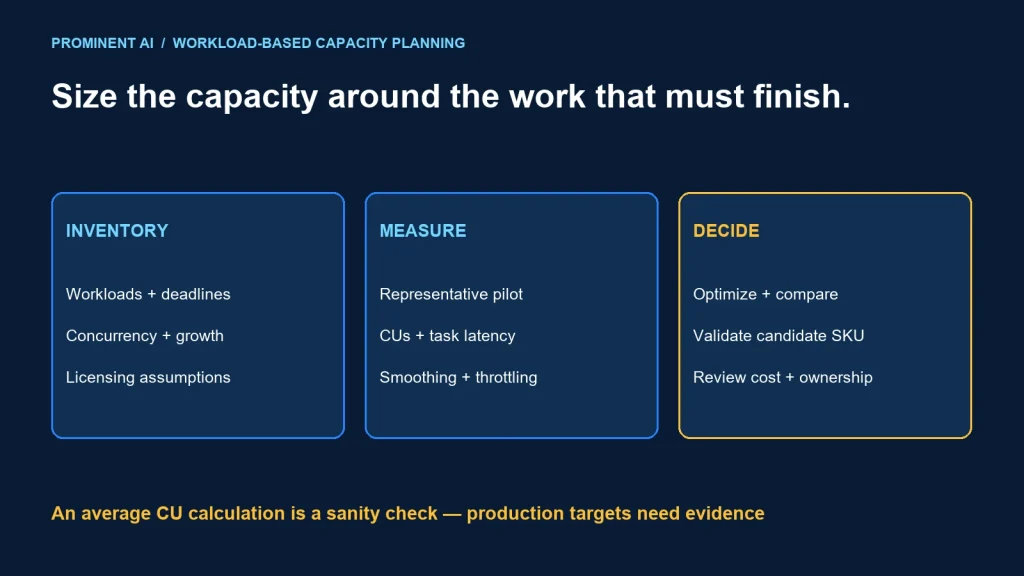
Size Microsoft Fabric capacity from representative workload measurements, concurrency and service targets—not from data volume or user count alone. Start with a documented workload inventory, measure a realistic pilot in the Capacity Metrics app, then compare scheduling, optimization and capacity options. An F SKU defines a compute resource pool; it is not a promise that a particular number of reports or pipelines will meet your response-time target.
Key takeaways
- Measure overlapping interactive and background work, including recovery and month-end peaks.
- Use CU consumption alongside query latency, job completion and throttling evidence.
- Separate compute, storage, licensing and operating costs in the budget.
- Validate a candidate size before committing to a longer-term purchasing arrangement.
Understand F SKUs, CUs and workload consumption
A Fabric capacity is a resource pool to which workspaces are assigned. F SKUs provide different amounts of capacity units, or CUs. Microsoft’s capacity planning guidance lists F2 as 2 CUs, F8 as 8, F16 as 16, F32 as 32 and F64 as 64. The platform evaluates consumption in 30-second timepoints. CU-seconds describe consumed compute over time; CUs describe capacity.
For example, F16 corresponds to 16 × 30 = 480 CU-seconds for a 30-second interval. This arithmetic explains the unit. It is not a guarantee that a specific operation completes in that interval. Actual consumption, smoothing and workload behavior need observation.
| Example SKU | CUs | CUs × 30 seconds | Interpretation |
|---|---|---|---|
| F8 | 8 | 240 CU-seconds | Nominal interval arithmetic |
| F16 | 16 | 480 CU-seconds | Not a workload benchmark |
| F32 | 32 | 960 CU-seconds | Validate with representative demand |
| F64 | 64 | 1,920 CU-seconds | Review licensing separately |
Capacity and user licensing solve different questions. Validate who creates, shares and consumes each item using the current Fabric licensing guidance. Do not choose a compute size solely to avoid investigating licensing, or assume a capacity purchase covers every authoring and viewing scenario.
Write the sizing assumptions before choosing a SKU
Inventory workloads by business outcome. A refresh deadline for a finance report and an exploratory notebook have different urgency, even when both consume the same pool. Record the owner, acceptable completion time, schedule, retry behavior and dependencies for each critical workload.
| Workload | Assumptions to capture | Evidence needed |
|---|---|---|
| Reports and semantic models | Concurrent users, model size, query patterns and refresh windows | Representative query latency and refresh completion |
| Data ingestion and transformation | Arrival rate, increments, batch sizes and recovery backlog | Job duration, consumption and retry counts |
| Warehouse and lakehouse queries | Scan patterns, concurrency and data layout | Query plans, latency distribution and consumption |
| Spark and notebooks | Session patterns, job sizes and scheduling overlap | Measured runtime and relevant compute billing mode |
Include growth assumptions explicitly: new departments, more frequent refreshes, larger history or higher concurrency. Record these as planning hypotheses with an owner and review date. “Twice the data next year” does not imply exactly twice the required capacity; a changed access pattern can matter more than stored volume.
Run a pilot that includes the difficult periods
- Define acceptance targets. Agree on query response, refresh freshness, pipeline deadlines and tolerated failures.
- Choose representative data. Include realistic table sizes, skew and access patterns, while respecting data-handling rules.
- Reproduce concurrency. Run reports during ingestion and transformation rather than testing every workload in isolation.
- Inspect timepoints and operations. Use the Capacity Metrics app to attribute pressure to items and workloads.
- Repeat after one controlled change. Compare scheduling or optimization against the same scenario before resizing.
Capture a business cycle long enough to include peak periods and carryover. A short quiet-hour demonstration can hide the effect of recurring background work. Record the capacity configuration and test conditions so later results remain comparable.
Understand smoothing before diagnosing a spike
Microsoft’s throttling documentation explains bursting and smoothing: operations can consume compute above the provisioned rate temporarily, with consumption distributed over time. Sustained overuse can lead to delays or rejected work. Review timepoints, carryforward consumption and the affected operations; an isolated utilization spike alone is insufficient diagnosis. Workload-specific modes, including separately configured Spark options, can alter the relevant behavior, so verify your current configuration.
Compare scenarios instead of prescribing a universal size
The following are fictional planning cases, not measured customer workloads or SKU recommendations. Each case identifies the next experiment needed to make a sizing decision.
| Scenario | Declared assumption | First comparison | Acceptance evidence |
|---|---|---|---|
| Departmental analytics | Morning reports overlap a daily load | Current schedule versus an earlier incremental load | Report latency and freshness remain acceptable |
| Shared enterprise platform | Independent teams launch jobs during business hours | Shared capacity versus isolating critical workloads | Critical deadlines hold during concurrent demand |
| Development workspace | Work is limited to a defined working window | Always available versus an approved operating schedule | No required refresh or user access is interrupted |
| Month-end reporting | Backlog and interactive demand rise together | Preprocessing, staggered jobs and candidate capacity sizes | Peak-cycle completion and recovery meet targets |
Use simple arithmetic as a sanity check, not a substitute for platform metrics. If a hypothetical day consumes 691,200 CU-seconds, dividing by 86,400 seconds gives an average of 8 CUs. That does not establish that F8 will meet peak concurrency or response-time needs. The same daily total can arise from very different demand patterns.
Optimize the workload and the commercial model
Build a budget with separate rows for capacity, storage, user licensing, data movement where applicable and operating effort. Use current regional quotes and your contract terms rather than copying a generic internet price. Distinguish list pricing from negotiated or reserved arrangements.
Reduce avoidable work first: eliminate repeated full scans, unused refreshes, duplicate transformations and unnecessary retained intermediate data. Validate incremental processing against late-arriving records and corrections. A fast but incomplete load does not meet the business requirement.
Scheduling can help when deadlines allow it. It cannot fix a workload whose sustained demand exceeds available resources. Likewise, separating critical and experimental work can improve ownership and isolation, but may add cost and administration. Measure that trade-off.
Pause and resume require an availability decision
Microsoft documents that pausing an F capacity can make assigned content unavailable. It also settles remaining smoothed operations and cumulative overages into the Azure bill. Review the pause/resume guidance before using schedules. Do not present pausing as a way to erase consumed compute or interrupt a production capacity without checking its users and jobs.
Workload saturation and release checklist
- Which items account for consumption during the affected timepoints?
- Are interactive delays, rejected operations or missed deadlines actually observed?
- Does the problem persist across comparable business periods?
- Do retries increase pressure or conceal an earlier failure?
- Can one query, refresh or transformation be optimized before scaling?
- Have growth, recovery and month-end scenarios been tested?
- Is there a named owner for resizing, budget alerts and regression review?
Approve a capacity decision with the assumptions, observed metrics, cost basis and next review date attached. Revisit it after substantial workload changes. Sizing is an operating practice rather than a permanent answer produced by one calculator.
Common questions
How much Microsoft Fabric capacity does a business need?
Measure representative workloads and concurrency against business targets. Data size and user counts help describe demand but do not independently determine a reliable SKU.
Does a high utilization spike mean I must scale immediately?
No. Inspect smoothing, carryover, throttling and task performance. Optimize or reschedule where appropriate, then test a larger size if sustained demand requires it.
Is F64 the right starting point for every organization?
No. Compute demand and licensing requirements both need assessment. Choose a pilot and validate the candidate size for your actual workload and user scenarios.
Can I pause capacity to avoid all charges?
Pausing affects availability and does not erase prior consumption. Microsoft documents settlement of remaining smoothed operations and cumulative overages when pausing.
Should development and production share capacity?
Evaluate isolation, cost and ownership. Shared capacity can be economical, but unpredictable development activity may interfere with production service targets.
Turn sizing assumptions into a measured implementation plan
Bring your workload inventory, refresh deadlines and current metrics to a review. Plan your Microsoft Fabric implementation around a representative pilot, clear ownership and evidence for the next capacity decision.